



Small business IT support can keep everyday technology problems from interrupting your team’s work. A small business can lose hours to a problem that sounds minor: employees cannot access email, a shared drive stops syncing, office Wi-Fi keeps dropping, or a new employee cannot log in. When nobody owns those issues, they interrupt work and often get fixed only after they become urgent.
Small business IT support gives employees a place to get help and gives the business a plan for maintaining its technology. Depending on the provider and agreement, support may include help desk assistance, device and network management, cybersecurity, cloud services, backups, and technology planning. The right arrangement depends on what your team uses, how much downtime it can tolerate, and whether you already have an internal IT person. This guide explains what to compare, which costs to ask about, and how to tell whether a provider will fit the way your business works.

What Does Small Business IT Support Include?
“IT support” can mean different things from one provider to another. One company may troubleshoot problems only when you call. Another may monitor devices, manage updates, support cloud accounts, and help plan technology changes. Before comparing prices, ask each provider to list what is included and what costs extra.
Common areas of business IT support include:
- Help desk and user support: Help with login problems, email, software, printers, computers, and other everyday issues.
- Device management: Setting up and maintaining laptops, desktops, servers, and mobile devices.
- Network support: Maintaining Wi-Fi, switches, routers, firewalls, and connectivity between locations.
- Cloud and account management: Supporting platforms such as Microsoft 365, email, file storage, and collaboration tools.
- Security: Managing patches, user access, endpoint protection, email security, and employee security practices.
- Backup and recovery: Protecting business data and helping restore files or systems after accidental deletion, hardware failure, or another disruption.
- Technology planning: Helping prioritize upgrades, plan new locations, and budget for IT.
These services may be bundled or priced separately. A business that needs occasional troubleshooting may not need the same plan as a company with several locations, regulated data, or a team that depends on specialized software. Start by writing down the systems employees rely on each day. Include internet access, business email, accounting or scheduling software, customer records, shared files, payment systems, printers, and any equipment connected to the network. Then note who supports each one today. If three vendors point at each other when something fails, the support arrangement needs clearer ownership.
A provider should also explain where its responsibility stops. For example, a support plan may cover a workstation but exclude a specialized line-of-business application. It may maintain a firewall but require the business to approve rule changes. The written scope should name these boundaries. A clean list prevents an argument about whether a task was “included” when a problem is already affecting customers. Solzorro lists help desk support, monitoring and maintenance, cybersecurity and compliance, cloud management, backup and disaster recovery, network management, and hardware and software support among its services. Confirm the exact scope and service hours in the agreement before choosing a plan.
IT Support for Small Business Owners: Choosing the Right Model
A support model should match the problems your employees actually face. Small businesses commonly consider break-fix, managed, and co-managed arrangements, but providers do not always use these labels in the same way.
Break-fix support
Break-fix support means contacting a technician when something needs attention. It can suit a small team with stable systems and infrequent issues. The tradeoff is that routine maintenance may not happen unless you arrange it separately, and costs can be harder to predict when several problems arrive at once. Ask whether the provider offers a minimum billable time, after-hours pricing, or a travel charge.
Managed IT support
Managed IT support usually combines ongoing assistance with agreed maintenance or monitoring. The provider may watch for alerts, help keep devices updated, and handle routine requests under a recurring plan. What “managed” includes varies. One plan may include help desk labor; another may charge labor separately. Check the agreement for user and device limits, covered locations, security tools, included projects, and exceptions.
Co-managed IT support
Co-managed support combines an outside provider with an internal IT employee or team. The provider can take on selected work, such as help desk coverage, security monitoring, or projects, while internal staff retain other responsibilities. This can work when an in-house employee knows the business but lacks time or specialized capacity. It works poorly when nobody has clear ownership of shared tasks.
Use these questions to assess the level of coverage your business needs:
- How many employees and devices need support?
- Which systems would stop work if they were unavailable?
- Do employees work from one office, multiple locations, or remotely?
- Do you need regular onsite help, remote support, or both?
- Who handles new employee setup, account changes, and employee departures?
- Do you have an internal person who can manage IT requests?
- What response time do you need for a critical outage, and is that response time written into the agreement?
The last question matters. “Fast support” is not a measurable promise on its own. Ask how urgent issues are classified, how you open a request, when the response clock starts, and what happens outside normal business hours. Confirm that the published support page and the signed agreement describe the same coverage.
Also distinguish response time from resolution time. A provider may acknowledge a ticket quickly but need longer to solve it. Ask what communication you can expect while a problem remains open, whether urgent requests have a phone channel, and how the provider escalates an issue that affects several employees.
Compare Business IT Support Services Before You Buy
When comparing business IT support services, look beyond the monthly price. Two proposals can use similar labels while covering very different work. Ask providers to explain their scope in writing.
| What to compare | Questions to ask |
| Included support | Which users, devices, locations, and systems are covered? |
| Requests and response | How do employees contact support? What are the response targets by priority? |
| Maintenance | Are updates and routine maintenance included? Who approves changes? |
| Security | Which security tasks are included, and which require a separate service? |
| Backup and recovery | What data is protected, how long is it retained, and how is a restore test handled? |
| Onsite work | Is onsite support included, limited, or billed separately? |
| After-hours coverage | What counts as an emergency, and what rates or terms apply? |
| Projects | Are migrations, new offices, and major upgrades included or quoted separately? |
| Agreement | Is there a minimum term, cancellation notice, or onboarding fee? |
Compare pricing models carefully. Some plans charge per user, others per device, by the hour, or through a monthly package. Ask what happens when you add staff, replace equipment, need onsite work, or request a large project. A useful quote should explain the assumptions behind the number. Solzorro’s pricing page currently lists hourly break-fix support, monitored service priced per device, and a managed plan priced per user. It also lists conditions for each option, so treat published rates as a starting point and confirm the cost and included work in a quote for your setup. Prices and terms can change; check the live pricing page before publishing specific figures.
For any provider, ask whether onboarding is included. A transition may require documenting devices, setting up accounts, reviewing backups, checking administrator access, and transferring support requests. Those tasks take time. If onboarding is free, clarify what it covers. If it is billed separately, ask what deliverables you receive when it is complete. Check how the provider handles security. Ask who manages software updates, user access, endpoint protection, email threats, and backup alerts. CISA recommends keeping offline, encrypted backups of critical data and regularly testing their availability and integrity. Ask the provider when it last verified that a backup could be restored, not only whether the software reports a successful job.
Ask who will work with your team. Support is technical work and communication. Find out how tickets are assigned, whether employees can speak to a technician, and how recurring issues are documented. If a problem keeps returning, someone should investigate the cause rather than close each ticket after a temporary fix. If your business works with regulated or sensitive information, ask the provider to explain its role in your security program. Do not assume that hiring an IT provider automatically makes the business compliant. The agreement should define tasks, while your organization remains responsible for its own policies, decisions, and legal obligations.
How to Choose IT Support for Small Businesses
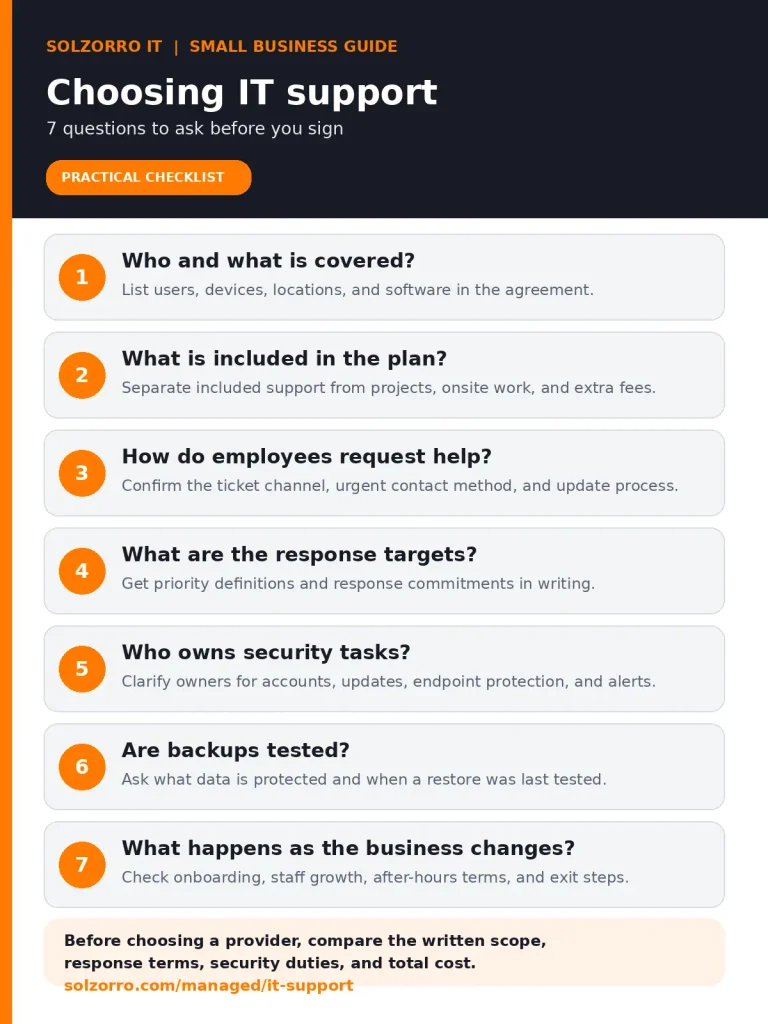
A good provider should be able to explain its service in terms your employees understand. Before signing an agreement, discuss your current setup and ask for a written proposal that reflects it.
- Scope: Does the proposal name the users, devices, software, and locations covered?
- Fit: Does the provider have experience with the systems your business depends on?
- Communication: Can employees reach support through a clear, documented process?
- Urgency: Are priority levels and response targets written down?
- Security responsibilities: Does the proposal state who manages accounts, patches, endpoint protection, and backups?
- Recovery: Can the provider explain how it tests restores and what recovery expectations it can support?
- Costs: Are onboarding, onsite work, after-hours support, projects, and extra devices addressed?
- Flexibility: Can the plan change if your staff count or technology needs change?
- Exit terms: Do you know how to cancel and retrieve your documentation and business data?
Ask for examples relevant to your situation. A medical practice can ask how the provider approaches access control and systems that hold sensitive information. A company with field employees can ask how support works away from the office. A team that relies on cloud software can ask who manages permissions and what happens when an employee joins or leaves. You can also ask the provider to walk through a realistic scenario: “Our email is unavailable on a Monday morning. What should an employee do, who receives the request, and how will we get updates?” Then ask about a lost laptop or a deleted shared file. Specific answers make it easier to compare providers than broad claims about being proactive or responsive.
Do not assume the lowest price is the least expensive option over time, or that the most expensive plan covers everything. Compare each proposal against your requirements. A clear agreement, suitable coverage, and a support process employees will use are more useful than services your business does not need. Before making a decision, ask for a short transition plan. It should state who collects system information, how administrator credentials are handled, when support requests move to the new provider, and what the business must do. If the changeover includes a security review or backup check, make sure the provider names the findings and next steps in writing.
Frequently Asked Questions?
What do small business IT services usually include?
Small business IT services can include help desk support, device and network management, cloud account support, cybersecurity, software maintenance, and backup and recovery. The exact services depend on the provider and plan. Ask for a written list of what is included, what is excluded, and how employees request help.
What should I look for in small business IT solutions?
Look for small business IT solutions that fit your team’s devices, locations, software, and security needs. Compare the support process, written response targets, backup and recovery procedures, contract terms, and total costs. Ask the provider to explain how it would handle a real issue your team might face.
Get a clear picture of your IT support options
Start by listing the systems your employees rely on and the problems that interrupt their work. Use that list to compare support scope, service terms, security responsibilities, and costs. Solzorro describes its IT support services as including help desk assistance, monitoring, cybersecurity, cloud management, and backup and recovery. Businesses can review the IT support services page and pricing options, then ask for a quote based on their environment.