



Choosing an IT support company is a business decision, not just a way to find someone who can reset a password. The provider may manage employee accounts, laptops, networks, cloud services, backups, and security tools. That makes the quality of the agreement and the day-to-day relationship just as important as the quote.
A good provider should be able to explain what it will manage, how quickly it responds, how it protects access to your systems, and what happens if you leave. Compare those details in writing. A polished sales presentation cannot answer them for you. This guide gives you a practical way to compare IT support companies, check service and security expectations, and choose an IT service provider that fits the way your business works.

Define what IT support for business should cover
Choose an IT support company that documents what it manages, how it responds, how it controls access, how it restores systems, what it charges, and how you can leave with your data and documentation. Before speaking with providers, make a short inventory of the work and systems they would support. You do not need a perfect asset register to begin. A rough list will make proposals easier to compare and reduce the chance that a provider prices only part of your environment.
Write down how many employees and locations you have, the devices people use, the main software and cloud services, your internet and network setup, and any systems that cannot be unavailable during business hours. Note whether you already have an internal IT person, whether staff work remotely, and what has caused the most disruption in the past year.
Also identify the data and business obligations that matter. A medical office, accounting firm, contractor, and retail shop may rely on different systems and face different contractual or regulatory requirements. Tell the provider what applies to you; ask it to explain how its proposed work supports those requirements. Do not assume that a standard service package automatically makes your business compliant. This inventory helps you decide whether you need a full managed service, occasional help, or a co-managed arrangement with your current IT employee. The right IT support for business depends on coverage gaps and risk, not simply the number of staff on payroll.
Compare IT support companies by written scope
Ask each provider for a service description that names the users, devices, locations, and systems included. It should also say what is excluded. For example, a monthly plan may include help desk support and routine endpoint maintenance while treating a major cloud migration, new office setup, or specialized line-of-business application as a separate project.
Check how employees request help, when support is available, and what response targets apply to urgent and routine issues. A response target is not the same as a resolution promise. Ask how the provider classifies priorities, when it escalates a ticket, and who communicates during a longer outage. If after-hours coverage matters, ask whether it is included and how emergencies are defined.
Look for clear ownership of routine tasks such as software updates, new employee setup, account changes, device monitoring, network maintenance, and vendor coordination. If two teams can both assume the other owns a task, small issues can linger. The contract and onboarding plan should make responsibility clear. A useful comparison starts with the service list, then tests the exceptions. Ask each provider to show the same sample scenario, such as a new employee starting Monday or a staff member losing access to email. The answer will reveal how intake, approval, setup, and follow-up actually work. Use the same questions with every finalist. A consistent checklist makes gaps easier to spot.
Review the service agreement, security responsibilities, and support process before choosing a provider.
What to expect from an IT service provider
A capable IT service provider should explain its support process in plain language. Ask who answers the phone or portal requests, whether the first contact is a technician or dispatcher, and how the team handles an issue it cannot fix remotely. If the provider uses subcontractors, ask which work they perform and what access they receive. Ask how the provider documents your systems and keeps that documentation current. You should know where administrator accounts, network diagrams, license details, warranties, and recovery instructions are recorded, and who can retrieve them if a key contact is unavailable.
Request a sample monthly or quarterly service report. It should help you see recurring problems, unresolved risks, patching or backup exceptions, and recommendations that need a business decision. A report is useful when it leads to a clear next step, not when it is only a chart of ticket counts. References can help, but make them relevant. Speak with a customer of similar size or complexity and ask about communication, follow-through, staff turnover, and how the provider handled a difficult incident. A reference should not be asked to disclose confidential client information.
Check security, access, and incident handling
An IT support company may have administrator access to important parts of your business. Treat that access as a supplier risk to manage. Ask how technicians authenticate, whether multi-factor authentication is required, how privileged accounts are limited, and how access is removed when an employee or subcontractor no longer needs it. Clarify what security work is included. The provider may manage patching, endpoint protection, email security, monitoring, or network controls, but the exact scope varies. Ask who reviews alerts, what happens after a suspected compromise, how quickly your business is notified, and who leads coordination with your insurer, legal counsel, or other vendors when needed.
CISA advises businesses to review provider contracts for appropriate security controls, monitoring and logging of provider-managed systems, monitoring of provider activity and connections, and notification of suspected or confirmed incidents. Those are practical topics to discuss before granting broad remote access. NIST’s Cybersecurity Framework supply-chain guide also recommends defining and communicating requirements for technology suppliers. Ask for evidence that matches your needs. This might include written policies, a description of access controls, an incident response process, or independent assurance reports where available. Do not accept a vague statement such as “security is handled” without learning which tasks the provider owns and which remain yours.
Make backup and recovery expectations concrete
A backup product does not prove that your business can recover. Ask which systems and data are covered, how often copies run, where they are stored, how long they are retained, and whether backups are protected from an attacker who compromises ordinary administrator accounts. Ask how often the provider tests restores and whether the tests include the systems your employees rely on to operate. Make sure the agreement identifies who approves recovery priorities, who contacts your team during an incident, and what happens if a restore takes longer than expected.
Two useful planning terms are recovery point objective (RPO), which describes how much recent data the business can afford to lose, and recovery time objective (RTO), which describes how long a service can be unavailable before the impact becomes unacceptable. You do not need to invent precise numbers on your own. Work with the provider to set targets based on business impact, then record what the proposed plan can and cannot meet. The FTC’s small-business cybersecurity guidance recommends regular backups and incident-response and recovery planning. Use that as a prompt to ask for a plan you can review, rather than relying on a sales promise that everything is backed up.
When local IT support matters
Local IT support can be useful when you need hands-on help with network equipment, office moves, conference-room systems, or devices that cannot be fixed remotely. A nearby team may also understand the practical realities of supporting more than one local site. Still, location alone does not tell you how quickly a provider will respond or whether onsite work is included.
Ask how the provider decides between remote and onsite service, what the onsite response target is, whether travel is billed separately, and which service areas are covered. If your business operates outside Utah or across multiple time zones, ask how the provider handles those locations and who is available after normal local hours. Many everyday support issues can be resolved remotely, so a local office should not be the only selection criterion. Compare the full support process: the person who receives a request, the technician who works on it, the escalation path, and the plan when remote troubleshooting is not enough.
Compare the full cost and agreement
Request a written quote that separates recurring fees from one-time onboarding, project work, hardware, software licenses, after-hours support, and out-of-scope requests. Ask whether pricing is based on users, devices, locations, or a combination, and what triggers a price change. This helps you compare proposals on the same basis instead of choosing the lowest headline number.
Read the service agreement for initial term, renewal, cancellation notice, payment terms, annual price changes, liability and insurance language, data handling, confidentiality, and security responsibilities. Ask what happens to accounts, passwords, configurations, documentation, licenses, and backups when the agreement ends. The provider should describe a workable handoff process. A low monthly price can be reasonable if the scope is narrow and understood. It becomes a problem when essential work is excluded, hourly charges are unclear, or the business cannot leave without losing access to its own systems. Ask for a sample invoice and a realistic example of a change request before signing.
Questions to ask before choosing
Take the same questions to every finalist so you can compare the answers fairly:
- Who will be our day-to-day contact, and how do we reach support?
- What work is included in the monthly fee, and what is billed separately?
- What response targets apply to different priorities?
- How do you control and review technician and subcontractor access?
- How do you notify customers about a suspected security incident?
- When was the last restore test, and what did it cover?
- What information and credentials do we retain if we end the agreement?
- Can you provide references from businesses with a similar environment?
Ask for examples and written terms. A provider may not be able to share another customer’s confidential records, but it should be able to explain its process and show appropriate, sanitized evidence.
Warning signs in a proposal
Pause if the proposal promises that problems will never happen, avoids measurable response targets, or treats every security question as confidential. Other concerns include unclear administrator ownership, backup claims without restore testing, unlisted subcontractors with broad access, and no incident-notification process. Be cautious when a provider pressures you to sign before explaining the scope or discourages you from keeping your own administrator access and documentation. A good relationship should make your systems easier to understand, not harder to leave.
A simple way to make the final choice
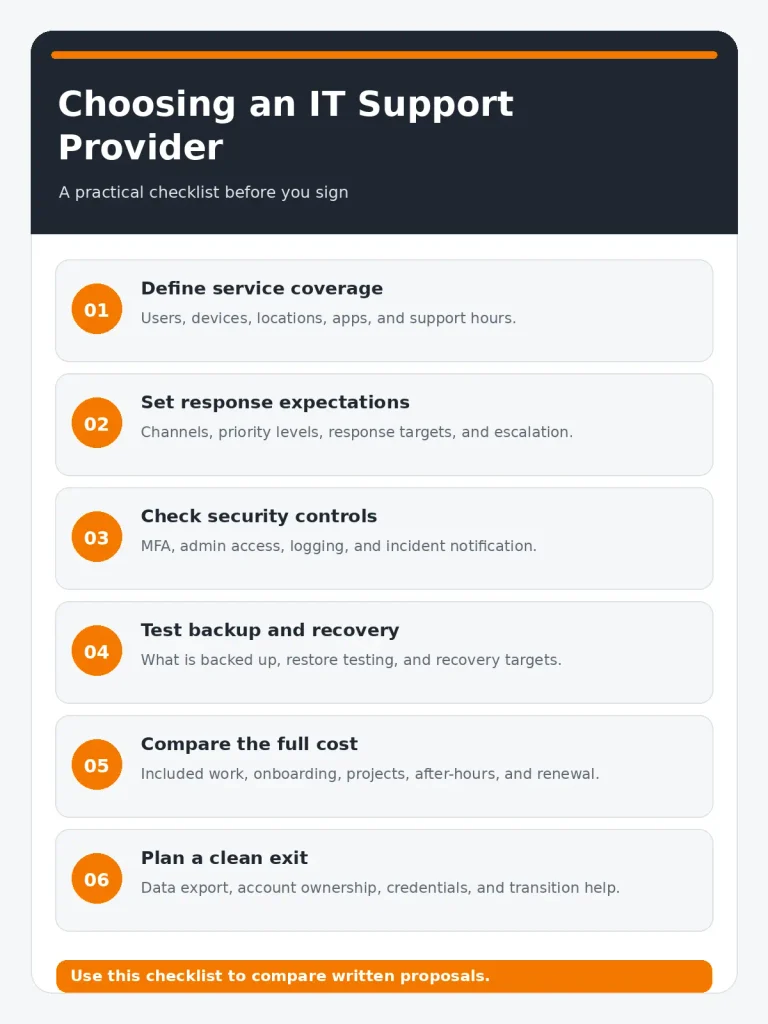
Shortlist two or three providers. Give each the same environment summary and ask for a proposal that uses the same service categories. Compare the written scope, support targets, security responsibilities, recovery plan, total cost, and exit terms. Then speak with references and meet the people who would handle your account.
Provider comparison checklist
| What to compare | Questions to ask |
| Coverage | Which users, devices, locations, and systems are included? |
| Response | What are the response targets by priority, and how are after-hours emergencies handled? |
| Security | How are admin access, MFA, logs, alerts, and incident notices handled? |
| Recovery | What is backed up, how are restores tested, and what recovery targets apply? |
| Cost | What is included, what is extra, and how can fees change? |
| Exit | Can we export data and documentation, retain our accounts, and get transition help? |
Do not select on promises alone. Choose the provider whose approach fits your business, whose responsibilities are clear, and whose answers hold up when you ask for specifics. If you are evaluating IT support for a small business, that clarity is often more useful than a long feature list. Solzorro’s IT support page describes its Utah-based support offering, including help desk, proactive maintenance, cybersecurity, cloud, backup, network, and hardware support. Businesses considering a provider can review the current scope on the service page and request a conversation about their own requirements.
Frequently Asked Questions?
What IT support services for small business are commonly included?
IT support services for small business plan may include help desk support, device and account management, monitoring, patching, network support, cybersecurity, cloud administration, and backup coordination. The exact list varies. Confirm which users and systems are covered, what hours apply, and which tasks are billed separately.
Do I need local IT support for small business, or can remote support work?
Remote support can handle many account, software, and troubleshooting issues. Local IT support for small business can help when equipment needs hands-on attention or a site visit. Ask how onsite requests are scheduled, what response target applies, and whether travel or onsite time costs extra.
How do I compare IT support companies fairly?
Give each provider the same description of your users, sites, systems, and support needs. Compare written service scope, response targets, security responsibilities, backup and recovery, total cost, references, and exit terms.
What should an IT supports company put in its contract?
The agreement should define included work, exclusions, response targets, security and access responsibilities, incident notification, data handling, backup scope, pricing, renewal and cancellation terms, and how accounts and documentation are returned at exit.
Should a small business use one IT service provider for everything?
Not always. A single provider may simplify coordination, but a business can also keep internal IT staff or specialist vendors. Decide based on accountability, expertise, security oversight, and how service issues will be coordinated.
Talk with Solzorro about your IT support needs
If your business is reviewing support coverage, security responsibilities, or its current provider agreement, start by outlining the systems and response expectations that matter most. Solzorro describes its Utah IT support offering on its service page; you can review the current scope and request an assessment there. Review Solzorro IT support services
For a broader overview of small business IT support, see the related small business IT support guide.