


Moving your business systems off aging servers feels overwhelming when you do not know where to start. Concerns about security, budget, and downtime quickly mount, trapping many teams on antiquated technology that hinders expansion.
The gap usually comes down to planning rather than technology. A weak cloud migration strategy leads to blown budgets, broken applications, and frustrated staff, which is exactly why the approach matters more than the tools you pick along the way.
The good news is that a clear, repeatable method removes most of the guesswork. When you break the move into defined stages, the entire shift becomes predictable, measurable, and far less stressful for everyone involved.
What a Cloud Migration Strategy Means
A cloud migration strategy is the documented plan that guides the movement of your workloads, data, and applications from on-premises hardware to cloud environments. It defines the order of the move, the people responsible, and the success measures.
Think of it as the blueprint behind a smooth transition. Without one, teams migrate blindly, discover surprises mid-project, and often roll everything back. With one, each decision connects to a business goal such as cost savings, scalability, or resilience.
Your cloud migration plan should also answer the hard questions early. Which apps move first? What stays on-premises? How are you going to manage compliance and security? Answering these before touching production saves weeks of rework later.
Core Steps of the Cloud Migration Process
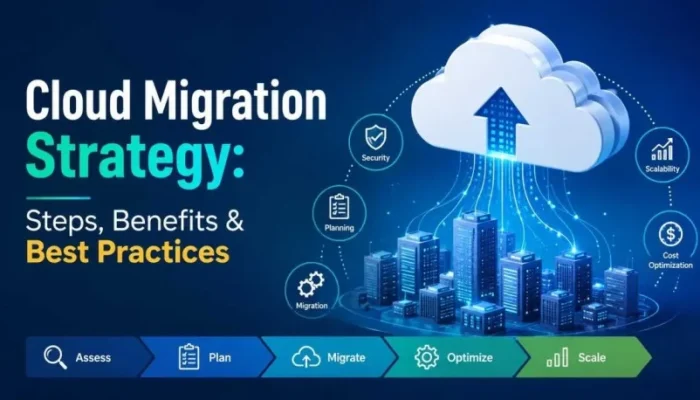
Every successful cloud migration process follows a logical sequence rather than a random rush to the cloud. The steps listed below provide a dependable cloud migration roadmap that you may modify to fit practically any setting.
Start with a full cloud migration assessment. Inventory your servers, databases, applications, and dependencies. Knowing what you own and how systems connect prevents the classic mistake of moving one app while forgetting the three services it quietly relies on.
Next, choose a migration approach for each workload. The common models are rehosting (lift and shift), replatforming, refactoring, repurchasing, retaining, and retiring. Mapping each application to the right model keeps effort and cost aligned with actual business value.
Then design your target environment and build a cloud migration plan with timelines, owners, and rollback steps. Before scaling the move over the remaining systems in controlled waves, test it with a low-risk workload to verify performance.
Finish with testing, optimization, and monitoring. Measure speed, cost, and reliability against your baseline, tune resources, and decommission old hardware once everything runs cleanly in production.
Key Benefits of Moving to the Cloud
The payoff for careful cloud migration planning shows up quickly once workloads stabilize. Scalability tops the list, since you can add or remove capacity in minutes instead of ordering hardware and waiting weeks.
Cost control is another major win. Pay-as-you-go pricing turns large capital purchases into predictable operating expenses, and right-sizing tools help you avoid paying for idle resources month after month.
Reliability and security often improve too. Leading providers offer built-in redundancy, automated backups, and compliance certifications that most small teams cannot replicate on their own hardware, which strengthens uptime and data protection.
Finally, your team gains flexibility. Remote access, faster deployments, and easier collaboration free staff to focus on growth work instead of babysitting physical infrastructure and patching aging equipment.
Best Practices for a Smooth Migration
Strong cloud migration best practices separate calm projects from chaotic ones. The first rule is to migrate in phases. Small, tested waves reduce risk and give your team confidence before larger workloads move.
Build a detailed cloud migration checklist covering security, backups, DNS changes, user access, and rollback triggers. A written list keeps nothing from slipping through the cracks during high-pressure cutover windows.
Adopt a repeatable cloud migration framework so every workload follows the same tested pattern. A consistent cloud migration strategy framework makes results predictable, shortens future projects, and helps new team members contribute faster.
Watch costs and performance from day one. Set budget alerts, tag resources by project, and review usage weekly. Early monitoring catches waste before it grows into a surprise invoice at the end of the month.
Communicate constantly. Keep stakeholders informed about timelines, expected downtime, and progress. Clear updates build trust and prevent the confusion that derails otherwise solid technical work.
Common Mistakes to Avoid
The biggest error is skipping the assessment phase and moving straight into execution. Undocumented dependencies then break in production, forcing painful and expensive rollbacks under pressure.
Another frequent slip is lifting and shifting everything without question. Some legacy apps run poorly in the cloud and cost far more than expected, so evaluate each workload on its own merits.
Ignoring security during the move is equally risky. Misconfigured storage, open ports, and weak access rules are leading causes of breaches, so bake protection into your cloud migration roadmap from the start rather than bolting it on later.
Frequently Asked Questions
What is the initial step in a cloud migration strategy?
The first step is a complete assessment of your current environment. Applications, data, and dependencies are inventoried, and each workload is then matched to a migration model. This preparation avoids expensive shocks during the actual transfer and influences all subsequent decisions.
How long does cloud migration take?
Timelines vary by scope. A single application may move in days, while a full data center transition can span several months. A phased cloud migration plan with clear waves keeps the project on schedule and reduces business disruption.
What are the main cloud migration models?
The six common models are rehost, replatform, refactor, repurchase, retain, and retire. Rehosting moves apps as-is, refactoring rebuilds them for the cloud, and retirement removes unused systems. Each workload gets matched to the model that fits its value and complexity.
How do you reduce risk during migration?
Reduce risk by migrating in small waves, testing each phase, and keeping rollback steps ready. Strong backups, ongoing monitoring, and a documented cloud migration checklist identify problems before they affect production users.
Is cloud migration cost-effective?
Yes, when planned well. Pay-as-you-go pricing, right-sizing, and retiring old hardware often lower total cost. Poor planning, however, can raise bills, so budget alerts and regular usage reviews are essential for savings.
Conclusion
A well-built cloud migration strategy turns a risky, uncertain project into a clear and repeatable process that protects your budget, uptime, and data. By assessing first, planning in phases, and following proven best practices, you set your business up for scalable and secure growth. If you want expert guidance at every stage of your move, Solzorro can help you plan, execute, and optimize a migration that aligns with your goals and keeps your operations running smoothly.